
PayMatch for Android
Download PayMatch
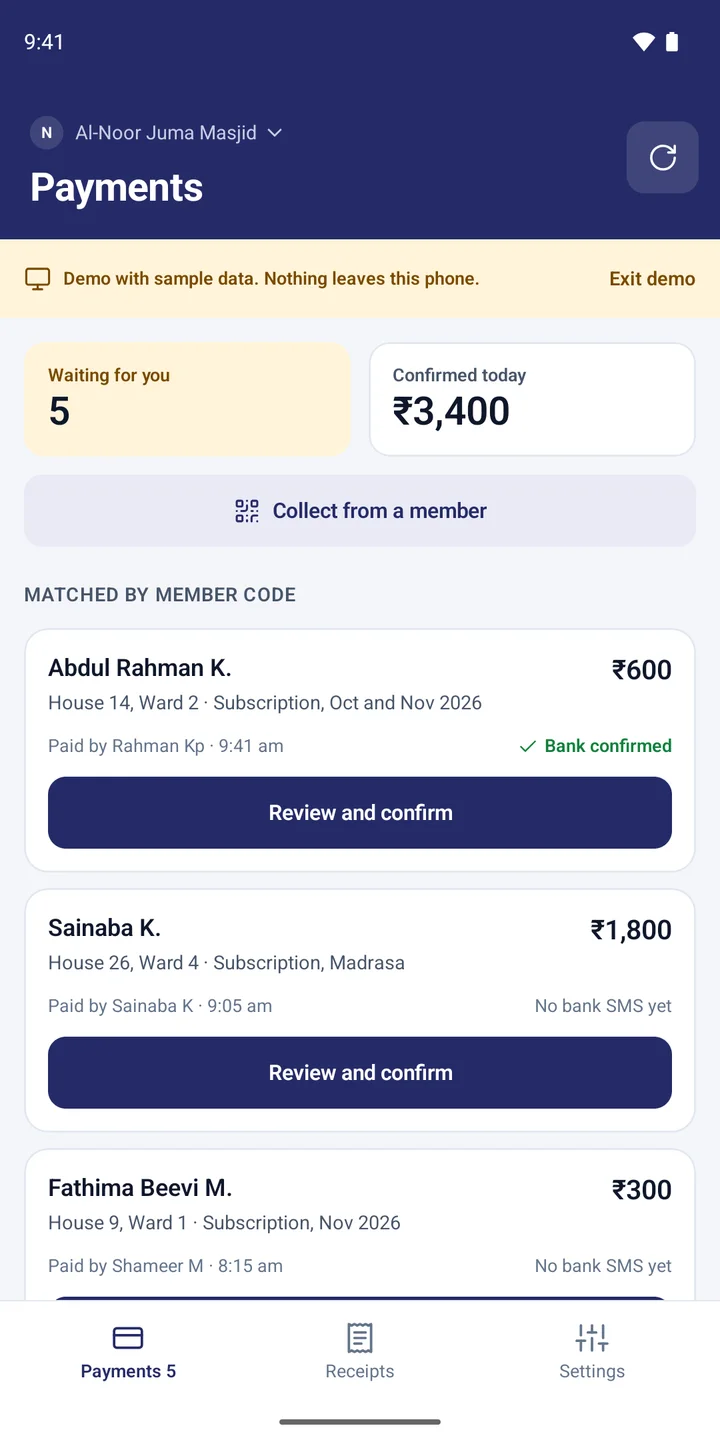
The payments app for mahallu and masjid committees on InflowBooks. It reads the Google Pay payment notifications on a committee phone, suggests the member and fund for each one, and issues the InflowBooks receipt when you confirm.
- Version
- 1.2
- Released
- 21 November 2026
Two ways to install
Both give you the same app. Google Play is the easier one to live with.
Google Play
- Updates arrive automatically
- Installed and checked by Google Play
- One tap, with no settings to change

Listed as “PayMatch: Mahallu Receipts”
APK from this website
- For a phone without Google Play
- The same app, signed by ZikkLabs
- No automatic updates: come back to this page for each new version
paymatch-1.2.apk · Checksum file
Use one or the other on a phone
Google Play and this website sign the app with different keys, so one cannot update the other. To switch, uninstall PayMatch, install it the other way, then connect the phone again from Account, Phones on your masjid’s dashboard. Uninstalling removes the payments still waiting on that phone for a member to be picked.
Check your download
Every release is signed by ZikkLabs. Before you install an APK, you can confirm that the file you have is the one we published.
Check it here
Choose the file you downloaded. It is checked on this device and is not uploaded anywhere.
This release
- File
- paymatch-1.2.apk
- Version
- 1.2 (build 5)
- Released
- 21 November 2026
- Size
- 1.5 MB (1,597,867 bytes)
- Package
- com.zikklabs.paymatch
- SHA-256
Signing certificate SHA-256
An install from Google Play is signed with Google Play’s app signing key instead:
Check it on a computer
Run the command for your computer in the folder that holds the file. The SHA-256 it prints must match the one above, character for character. The last command prints the signing certificate.
Windows (PowerShell)
Get-FileHash paymatch-1.2.apk -Algorithm SHA256macOS
shasum -a 256 paymatch-1.2.apkLinux
sha256sum paymatch-1.2.apkAndroid SDK
apksigner verify --print-certs paymatch-1.2.apk
Install the APK
- 1
Download the APK on the phone
Tap Download APK. The browser may ask you to confirm, as it does for any app file.
- 2
Open the file
Open it from the download notification or from the Files app.
- 3
Allow the install
The first time, Android says the browser is not allowed to install apps. Tap Settings, turn on “Allow from this source”, then go back.
- 4
Install and open
Tap Install. If Google Play Protect offers to scan the app, let it.
- 5
Connect the phone
On your masjid’s InflowBooks dashboard open Account, Phones, Connect a phone. Scan the QR code, or open the link on this phone.
Once it is installed you can turn “Allow from this source” off again.
What you need
- A masjid that uses InflowBooks. PayMatch is part of every masjid’s plan.
- A committee login that may record money received.
- Google Pay on this phone, receiving the masjid’s UPI payments.
- Android 8.0 or later.
What PayMatch asks for
-
Notification access
To read Google Pay’s payment notifications on this phone. It asks only after showing you what it reads, and discards other apps’ notifications unread.
-
Camera
Only when you tap Scan, to read a member’s pay QR. No picture is taken or saved.
-
Notifications
For payment alerts, and only if you turn them on. A locked screen shows no name or amount.
-
Screen lock
Your fingerprint, PIN or pattern before it issues receipts. PayMatch issues receipts only on a phone with a screen lock.
It asks for no SMS, contacts, call log or location permission. Read the privacy policy
New in 1.2
- One payment can settle dues in several funds, with a receipt for each. Change the split before you confirm.
- A warning when the same dues are paid twice.
- Collect: pick a member, or scan their pay QR, and show a QR with the amount filled in.
- Desk mode for collection day: payments appear on the QR screen, confirmed by a tap or automatically.
- Payment alerts for QR payments, with no name or amount on a locked screen.
- WhatsApp receipts go out as you confirm, if your masjid sends them.
Earlier versions
1.1
- On the committee of more than one masjid? Connect each from its own dashboard and switch between them at the top of the app. Each masjid sees only its own payments.
- The waiting count for every masjid shows in the switcher.
- Add another masjid or disconnect one in Settings. Your other masjids stay connected.
- PayMatch now shows your masjid's own colours and logo.
1.0
- First release.
- Reads Google Pay "paid you" notifications and suggests the member and fund from the member code in the UPI note
- Confirm to record the payment and issue the InflowBooks receipt
- Payments without a code stay on this phone until you pick a member
- Optional bank SMS check from your masjid's chosen bank sender
- English and Malayalam
- Connect from your masjid's InflowBooks dashboard: Account, Phones, Connect a phone.